A work tracker where nobody fills in a timesheet.
A timesheet is a guess written on Friday about a Tuesday. WorkQueue takes two timestamps for every task — the second it arrived on the employee's screen, and the second they pressed Complete — and every number on the reports is arithmetic on those two. Nobody starts a clock, so nobody forgets to.
Two clocks, and why they are different.
- Response time
- From the moment you press Assign to the moment the job is on their screen. On a healthy office network that is a couple of seconds. When it is not, that is worth knowing, and it is the number that tells you.
- Work time
- From arriving on the screen to the click on Complete. There is no pause button, because a pause button is somewhere to put a lie.
- Everything else on the reports
- Tasks closed per person per day, what is overdue, which priorities slip, how this Tuesday compares with last Tuesday. All of it is those two numbers grouped differently — there is no third source.
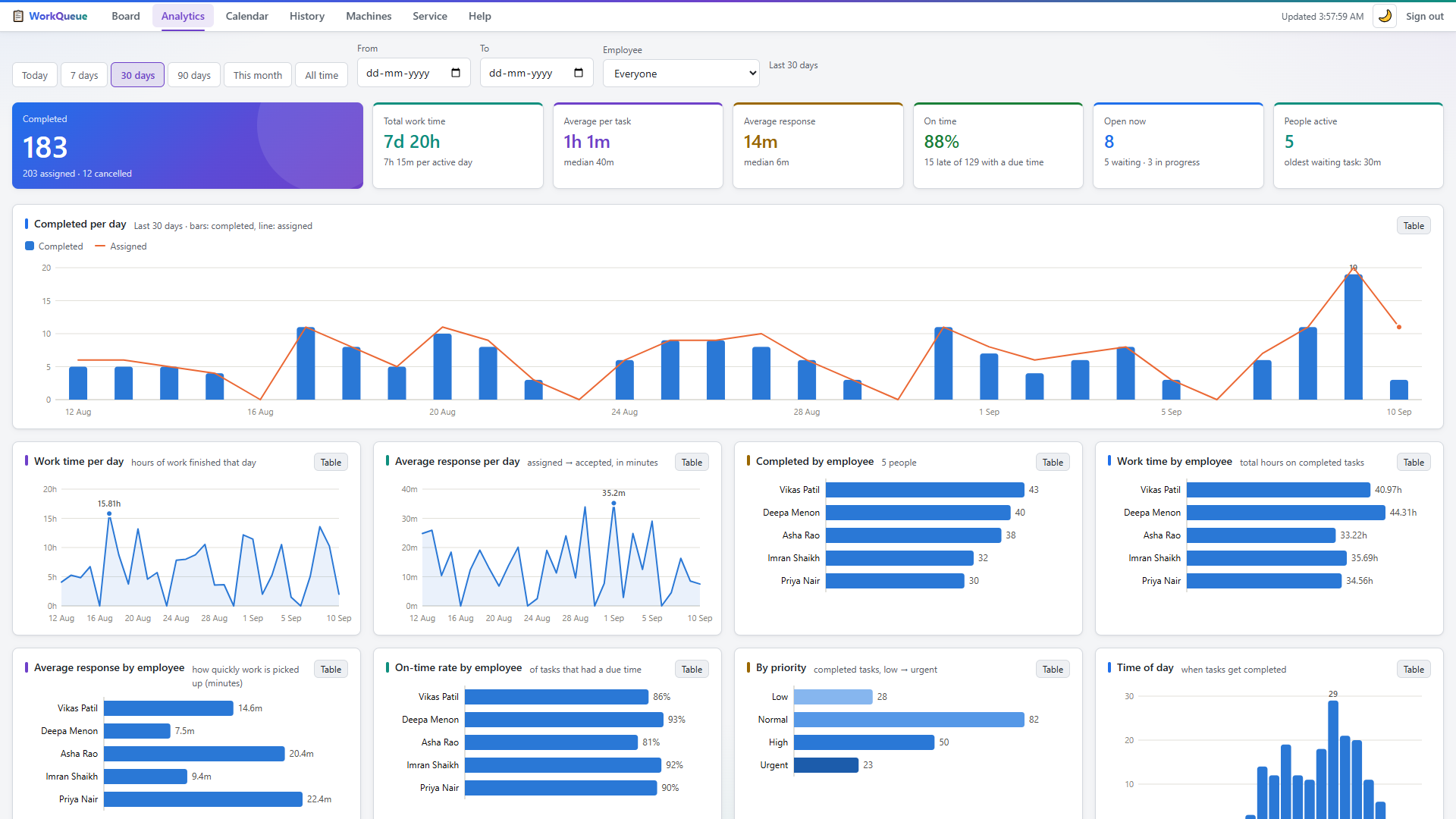
Questions you can answer on Monday morning.
Who is actually carrying it
Not who says they are busy — how many jobs each person closed, and how long each one took.
What is sitting still
A task assigned at nine and still open at four is on the board in the colour it went on with. Nothing has to be chased to find that out.
Whether it is getting better
Thirty days of the same two timestamps is a trend, and a trend is the only honest way to tell whether a change you made worked.
It keeps time when the network does not.
If the Wi-Fi drops, the strip keeps showing the tasks it already has and keeps accepting Complete. Those clicks queue on the employee's own PC with the real time they happened, and are delivered when the network comes back.
A job finished at 10:35 during an outage is recorded as 10:35, not as whenever the router recovered. Timing that only works on a good day is not timing.
What this deliberately is not.
Both halves matter when you are choosing. One of them is why the team will tolerate it; the other is why it might be too small for you.
It is not surveillance
- No screenshots, ever. Not on a timer and not at random.
- No keystrokes, no idle time. The keyboard and the mouse are not being read.
- No list of sites or apps. The software has no idea what else is open.
- No telemetry to us. It never contacts Quietworks. There is no licence check-in and no analytics call.
And it is not attendance software
- No clock-in or clock-out. It times tasks, not people. There is no daily total of hours at a desk.
- No hours-worked report. If payroll needs one, this is the wrong tool and we would rather say so now.
- No sprints or Gantt charts. It hands out jobs and times them. If you need a work-breakdown structure, buy one.
- Only what goes through it. Work handed out in the corridor is not in the numbers. That is true of every tool of this shape, and worth deciding up front.
Getting the numbers back out.
History exports to CSV, so it lands in the spreadsheet you already report from. The whole database exports as a JSON snapshot, or as the SQLite file itself if you would rather have the original.
There is no lock-in, because there is nothing of yours on our side to lock. The file is on your PC and you can copy it anywhere.
The things people ask about this
Does it track hours worked, like attendance software?
No. It times tasks, not people — there is no clock-in, no clock-out and no daily total of hours at a desk. If what you need is attendance or payroll hours, this is the wrong tool, and we would rather you knew that before the trial than after it.
Can an employee edit the times?
There is no field anywhere for typing in a duration. Every number on the reports comes from a click that actually happened — the task arriving on the strip, and Complete being pressed — so there is nothing to round up at the end of the week.
What about work that never goes on the board?
It is not in the numbers. If half the day's jobs get handed over in the corridor, half the day is missing, and no tool of this kind can fix that. It is worth agreeing up front how much of the work will actually go through it.
Do you see any of our numbers?
No. The software never contacts us. There is no telemetry, no licence check-in and no analytics call. If your office had no internet at all, WorkQueue would not notice.
Can I see the reports on my phone?
Yes. The dashboard is an ordinary web page served on your own network, so any phone on the office Wi-Fi opens it. Windows is only needed for the employee strip.
How accurate is the response time?
It is the gap between two events the software itself observed, on a local network, so it is generally a second or two rather than a guess. What it measures is the job reaching the screen — whether the person was looking at the screen is something no software can honestly tell you.
Try it on your own team for thirty days.
Every feature, unlimited PCs, no card and nothing to cancel. We will help you install it, and if it does not fit, nothing of yours has left the office.